The American Journal of Occupational Therapy and the Journal of Strength and Conditioning Research are now available electronically through the University of Salford's eLibrary. To access either title log in to eLibrary and select Find eJournal then search by title.
Both titles are provided by OVID. The American Journal of Occupational Therapy is available from 2000 onwards, and the Journal of Strength and Conditioning Research is available from 2003 onwards. You will need your Athens username and password to access these titles both on and off campus. (You can learn more about Athens in a previous blog post.)
These titles each have licences for 1 user so if you are turned away it is because the title is being used - wait a few minutes and try again!

Showing posts with label e-library. Show all posts
Showing posts with label e-library. Show all posts
Tuesday, 6 April 2010


Friday, 19 March 2010
eJournal passwords
Athens
The majority of eJournals subscribed to by the University of Salford can be accessed off campus using your Athens username and password. Athens is a system that identifies you as a member of a particular organisation, as part of your university computing account you are automatically given an Athens username and password. You can find out more about Athens by clicking here.
If you are a member of another organisation, for example another university, or the NHS you may also be given an Athens username and password to access their resources.
Your Athens details are case sensitive so make sure you enter your username in lower case and your password in upper case.
Proxy Authentication
Some eJournals require you to set up a proxy authentication. You can read more about this in another post.
Individual Passwords
A few eJournals have their own individual logins in order to access the full text of articles from off campus. ILS has produced a web page that allows you to check for the appropriate password for a journal. You can access this page at http://www.ils.salford.ac.uk/library/resources/epasswords/ however you must be on campus to view this information. If you need help accessing details of passwords from off campus contact your Information Specialist (you can find our contact details in the "About Us" page - there is a link at the top of the screen.)
Some Health & Social Care journals that require their own password are:
Infant
Journal of Occupational Science
Journal of Orthopaedic and Sports Physical Therapy
Mental Health Today
Mental Health Nursing
Neonatal Network
Sport and the Law Journal
You can also find information on passwords for eJournals on the Salford e-Library News blog at http://salfordelibnews.blogspot.com/search/label/passwords
The majority of eJournals subscribed to by the University of Salford can be accessed off campus using your Athens username and password. Athens is a system that identifies you as a member of a particular organisation, as part of your university computing account you are automatically given an Athens username and password. You can find out more about Athens by clicking here.
If you are a member of another organisation, for example another university, or the NHS you may also be given an Athens username and password to access their resources.
Your Athens details are case sensitive so make sure you enter your username in lower case and your password in upper case.
Proxy Authentication
Some eJournals require you to set up a proxy authentication. You can read more about this in another post.
Individual Passwords
A few eJournals have their own individual logins in order to access the full text of articles from off campus. ILS has produced a web page that allows you to check for the appropriate password for a journal. You can access this page at http://www.ils.salford.ac.uk/library/resources/epasswords/ however you must be on campus to view this information. If you need help accessing details of passwords from off campus contact your Information Specialist (you can find our contact details in the "About Us" page - there is a link at the top of the screen.)
Some Health & Social Care journals that require their own password are:
Infant
Journal of Occupational Science
Journal of Orthopaedic and Sports Physical Therapy
Mental Health Today
Mental Health Nursing
Neonatal Network
Sport and the Law Journal
You can also find information on passwords for eJournals on the Salford e-Library News blog at http://salfordelibnews.blogspot.com/search/label/passwords
Setting up Proxy Authentication on your PC
The majoirty of electronic journals available through Salford University can be accessed off campus using your Athens username and password. However, a few of the eJournals we subscribe to require you to set up 'proxy authentication' in order to view the full text from off campus.
If you access the journal through the eLibrary's 'Find eJournal' section you will see information on how to access the journal from off campus. If proxy setup is required this will be clearly stated.

The Proxy Service is required for a few journals where access is restricted to University members in such a way that it is not available from an off campus location. By setting up proxy access you are logging in to the network via your own PC.
ILS has produced a user guide that will take you through the steps needed to set up proxy access. This guide is avaiable at http://www.ils.salford.ac.uk/help/userguides/computing/webauth.pdf.
In order to set up proxy access you will need to know which internet browser you use (for example Internet Explorer or Firefox) - if you are not sure, look at the icon you click on to get to the internet. You will also need to know whether you have a dial-up or a broadband connection to the internet. Towards the end of the guide you will find a list of frequently asked questions, however if you have any problem setting up the proxy service you can contact the ILS Service Desk on ils-servicedesk@salford.ac.uk or 0161 2952444.
For more information on eJournal password see the blog http://healthinfoskills.blogspot.com/2010/03/ejournal-passwords.html
If you access the journal through the eLibrary's 'Find eJournal' section you will see information on how to access the journal from off campus. If proxy setup is required this will be clearly stated.

The Proxy Service is required for a few journals where access is restricted to University members in such a way that it is not available from an off campus location. By setting up proxy access you are logging in to the network via your own PC.
ILS has produced a user guide that will take you through the steps needed to set up proxy access. This guide is avaiable at http://www.ils.salford.ac.uk/help/userguides/computing/webauth.pdf.
In order to set up proxy access you will need to know which internet browser you use (for example Internet Explorer or Firefox) - if you are not sure, look at the icon you click on to get to the internet. You will also need to know whether you have a dial-up or a broadband connection to the internet. Towards the end of the guide you will find a list of frequently asked questions, however if you have any problem setting up the proxy service you can contact the ILS Service Desk on ils-servicedesk@salford.ac.uk or 0161 2952444.
For more information on eJournal password see the blog http://healthinfoskills.blogspot.com/2010/03/ejournal-passwords.html
Monday, 15 March 2010
LaSU - Reading List System @ Salford
The LaSU (Lists at Salford University) system was launched in February 2010 and provides access to reading list resources.
You can access LaSU directly via http://lasu.salford.ac.uk/ - from here you can browse through lists by faculty / school, or search using your module title or lecturer's name.

LaSU reading lists are also linked through Blackboard, taking you directly from your Blackboard module to the relevant reading list.
However you get to your LaSU list, you will see a list of resources recommended by academic staff for the module. You can link directly through to the library catalogue record or in some cases electronic access for the item, saving you time searching for your reading list materials.
You can get more information on LaSU, including a user guide, from the LaSU page on the ILS website: http://www.ils.salford.ac.uk/library/resources/lasu.php
You can access LaSU directly via http://lasu.salford.ac.uk/ - from here you can browse through lists by faculty / school, or search using your module title or lecturer's name.

LaSU reading lists are also linked through Blackboard, taking you directly from your Blackboard module to the relevant reading list.
However you get to your LaSU list, you will see a list of resources recommended by academic staff for the module. You can link directly through to the library catalogue record or in some cases electronic access for the item, saving you time searching for your reading list materials.
You can get more information on LaSU, including a user guide, from the LaSU page on the ILS website: http://www.ils.salford.ac.uk/library/resources/lasu.php
Thursday, 11 March 2010
Finding the full text of journal articles
Salford University has two library systems which you can use to find the full text of journal articles we subscribe to.
e-Journals...
The first place to visit is the e-Library, as most of our journals are now available electronically. Go to the student channel (http://students.salford.ac.uk/) and click the e-Library link. Log in with your university username and password.
From the e-Library homepage select the "Find e-Journal" option. The e-Journal search page appears. Type in the title of the journal you want to access (make sure it is the title of the journal, not the specific article...) You will see the system try to second guess which title you are looking for - either keep typing, or select from the options it provides. Click Go.
A list of journals that match your search appears. Click the title of the journal you want to open; a new window will open up. From here you can access the journal webpage by using the "View the Full Text..." link. Always check that we cover the years you need, and that you have the right password to access articles if you are working from off campus - both these pieces of information appear on this page.
Journal websites will allow you to navigate through to a particular article if you already have a reference (you may need to look for an option like "previous issues" or "archive"). You can also often carry out keyword searches within the journal to find articles published in that journal on a specific topic.
Print journals...
While most journals are now available electronically, some titles are still only held in print. If the e-Library does not locate the journal you want, then it is always important to check the Library Catalogue to make sure we dont have print access to that journal.
Access the library catalogue from the student channel page (http://students.salford.ac.uk/). From the catalogue search page, enter the title of the journal in the Title box; from the options on the right, select 'Journals Catalogue' from the collections drop-down list. Click search.
If the journal is available in the library you will see it appear in the results - all the journals for FHSC subjects should be held in the Allerton library and are shelved alphabetically by title on level 3. To find information on what years we subscribe to, click the show library holdings link at the bottom of the journal record.
If Salford dont have the journal...
If your journal, or the section of the journal you need, does not appear through e-Library or the Library Catalogue then we do not subscribe to it. Click the links below to visit the library website and learn more about other options available to you.
Document Delivery Service
Visiting Other Libraries
If you can't find the article you may need to search in one of the databases using your keywords to find other journal articles on that topic that we do subscribe to.
e-Journals...
The first place to visit is the e-Library, as most of our journals are now available electronically. Go to the student channel (http://students.salford.ac.uk/) and click the e-Library link. Log in with your university username and password.
From the e-Library homepage select the "Find e-Journal" option. The e-Journal search page appears. Type in the title of the journal you want to access (make sure it is the title of the journal, not the specific article...) You will see the system try to second guess which title you are looking for - either keep typing, or select from the options it provides. Click Go.
A list of journals that match your search appears. Click the title of the journal you want to open; a new window will open up. From here you can access the journal webpage by using the "View the Full Text..." link. Always check that we cover the years you need, and that you have the right password to access articles if you are working from off campus - both these pieces of information appear on this page.
Journal websites will allow you to navigate through to a particular article if you already have a reference (you may need to look for an option like "previous issues" or "archive"). You can also often carry out keyword searches within the journal to find articles published in that journal on a specific topic.
Print journals...
While most journals are now available electronically, some titles are still only held in print. If the e-Library does not locate the journal you want, then it is always important to check the Library Catalogue to make sure we dont have print access to that journal.
Access the library catalogue from the student channel page (http://students.salford.ac.uk/). From the catalogue search page, enter the title of the journal in the Title box; from the options on the right, select 'Journals Catalogue' from the collections drop-down list. Click search.
If the journal is available in the library you will see it appear in the results - all the journals for FHSC subjects should be held in the Allerton library and are shelved alphabetically by title on level 3. To find information on what years we subscribe to, click the show library holdings link at the bottom of the journal record.
If Salford dont have the journal...
If your journal, or the section of the journal you need, does not appear through e-Library or the Library Catalogue then we do not subscribe to it. Click the links below to visit the library website and learn more about other options available to you.
Document Delivery Service
Visiting Other Libraries
If you can't find the article you may need to search in one of the databases using your keywords to find other journal articles on that topic that we do subscribe to.
Tuesday, 9 March 2010
Impact Factors
Impact Factors are used within Science and Medicine as a method of rating journals and the articles published in them. An impact factor is measured by calculating the number of times articles within the journal were cited during the previous two years, divided by the number of 'citable items' (i.e. articles, letter etc) published in the journal during that time.
Impact factors are one way that researchers evaluate the quality of a paper - by seeing how 'good' the journal it is published in is, based on how many other papers have referred back to items published within that journal.
However, the impact factor is given for a journal title, so does not evaluate specific articles - an article in a journal with a high impact factor may have very few citations and vice versa.
How to find the impact factor for a journal...
Go to the e-Library and select the Find Database option.
From the A-Z list select 'W' and choose Web of Knowledge.
On the Web of Knowledge homepage select the yellow "Additional Resources" tab.
On the next screen, select "Journal Citiation Reports". From the options that appear, select "Search for a Specific Journal" and submit. Enter the journal title and click Search.
The database indexes thousands of publications, however it does not cover every journal published, so if your journal is not found then it is not covered by the Journal Citation Reports.
Impact factors are one way that researchers evaluate the quality of a paper - by seeing how 'good' the journal it is published in is, based on how many other papers have referred back to items published within that journal.
However, the impact factor is given for a journal title, so does not evaluate specific articles - an article in a journal with a high impact factor may have very few citations and vice versa.
How to find the impact factor for a journal...
Go to the e-Library and select the Find Database option.
From the A-Z list select 'W' and choose Web of Knowledge.
On the Web of Knowledge homepage select the yellow "Additional Resources" tab.
On the next screen, select "Journal Citiation Reports". From the options that appear, select "Search for a Specific Journal" and submit. Enter the journal title and click Search.
The database indexes thousands of publications, however it does not cover every journal published, so if your journal is not found then it is not covered by the Journal Citation Reports.
Thursday, 11 February 2010
Introducing Athens
Athens is a system for controlling access to web-based subscriptions, including many of those provided by ILS. As a member of Salford University, you will be given your own Athens username and password, to allow you access to our electronic resources. You may also receive Athens login details from other organisations connected to your programme, such as the NHS to access their subscriptions.
Your Athens username and password is strictly confidential and should not be shared with anyone else.
You can find your Athens login details saved in a file called "Password" on your F Drive. Log in to a computer on campus and double click the F Drive icon on the desktop. Open the password file - your Athens details are shown.
Remember your Athens username and password are case sensitive. Enter your username in lower case and your password in upper case.
Your Athens username and password is strictly confidential and should not be shared with anyone else.
You can find your Athens login details saved in a file called "Password" on your F Drive. Log in to a computer on campus and double click the F Drive icon on the desktop. Open the password file - your Athens details are shown.
Remember your Athens username and password are case sensitive. Enter your username in lower case and your password in upper case.
e-Library basics
E-Library is the access point to electronic (non-print) resources at Salford University. E-Library provides access to databases for searching, and electronic books, journals and dictionaries. You can access e-Library from the Student Channel. You will need your university username and password to log in.
Use e-Library QuickSearch to carry out basic, introductory searches. Log in to e-Library and select QuickSearch. You will see the following screen:
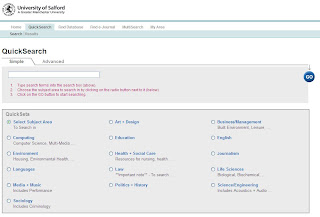
Enter your keyword(s) into the search box
Tick the Health and Social Care option, then click Go.
Your search will be carried out in health and social care related databases – once the search has finished you will be automatically taken to the results screen.
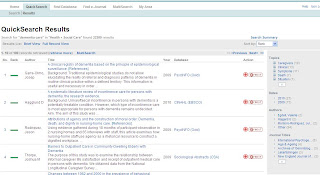
To view the record for a result click on the title.
To narrow your search down, use the options in the grey box on the right of the screen – you can select by keyword, date, author or journal.
To see if Salford University has access to the full text click the Find It button.
Use e-Library QuickSearch to carry out basic, introductory searches. Log in to e-Library and select QuickSearch. You will see the following screen:

Enter your keyword(s) into the search box
Tick the Health and Social Care option, then click Go.
Your search will be carried out in health and social care related databases – once the search has finished you will be automatically taken to the results screen.

To view the record for a result click on the title.
To narrow your search down, use the options in the grey box on the right of the screen – you can select by keyword, date, author or journal.
To see if Salford University has access to the full text click the Find It button.
Subscribe to:
Posts (Atom)